
Artificial intelligence has arrived at a historic inflection point: the paradigm shift from passive Large Language Models (LLMs) that merely generate conversational answers to Action-Oriented AI Agents capable of autonomous execution. In the past, users had to copy chatbot outputs, toggle between tabs, manually click buttons, and handle tedious clerical tasks. The unveiling of Muse AI has fundamentally rewritten how humans interact with modern computers.
Announced by Meta in September 2026, Muse AI is far more than a conventional conversational assistant. It is a genuine personal software agent provisioned with a dedicated persistent cloud virtual machine, engineered to browse websites, navigate desktop software, clean up storage, organize schedules, and proactively execute multi-step jobs on your behalf. In this authoritative guide, the engineering specialists at 1Marketing deconstruct the underlying architecture of Muse AI, analyze its game-changing business benefits, and provide step-by-step setup walkthroughs across Web, macOS, Mobile, and WhatsApp.
Key Strategic Takeaways for Tech Leaders & AI Practitioners
- Core Architecture: Muse AI is a next-generation Personal AI Agent developed by Meta, capable of autonomously resolving complex multi-step workflows directly within computing environments rather than merely outputting plain text suggestions.
- Dedicated Infrastructure: Powered by Muse Secure VM—an isolated persistent Linux cloud machine equipped with dedicated CPU, RAM, storage, and a synchronized shared web browser accessible concurrently by both the user and the agent.
- Autonomous Tool Generation (Self-Building Tools): When encountering an unfamiliar integration or custom calculation lacking pre-built APIs, Muse AI dynamically writes, compiles, and runs custom Python or JavaScript scripts inside its VM to fulfill the task.
- Zero-Trust Human-in-the-Loop Security: Features complete credential isolation and an OS-level Sentinel kernel monitor. High-consequence operations—including file deletion, financial transactions, and external emails—mandate explicit user confirmation before execution.
- Frictionless Multi-Platform Access: Available seamlessly across Web (
muse.ai), native macOS application, mobile apps (iOS & Android), and direct conversational triggers via WhatsApp.
1. What is Muse AI? The Quantum Leap from Static Chatbots to Action-Oriented AI Agents
Muse AI is an action-oriented personal artificial intelligence agent designed to automate digital chores and end-to-end workflows across personal computing environments. Rather than confining its utility to conversational dialogue, Muse AI directly interfaces with real-world operating systems and software ecosystems: browsing web applications, filling dynamic forms, decluttering local drives, harmonizing appointment calendars, and executing online purchases.
To grasp the significance of Muse AI, one must examine the architectural divergence between legacy conversational chatbots and modern agentic computing:
1.1. The Critical Divide: Conversational Chatbots vs. Autonomous Agents
Before Muse AI, users relied primarily on first-generation conversational chatbots such as early ChatGPT, Claude, and Gemini. These systems operated strictly under a prompt-and-response loop: you supplied instructions, and the model formulated recommendations. However, the entire burden of physical execution remained squarely on the human operator. If you needed to reserve flight tickets or purge obsolete downloads, a chatbot could only summarize the procedure, leaving you to manually execute the mouse clicks, form submissions, and terminal commands.
Conversely, Muse AI belongs to the emerging class of Agentic AI. When presented with a generalized objective, Muse systematically executes a 5-stage pipeline:
- Task Breakdown: Deconstructs macro goals into atomic, verifiable sub-tasks.
- Workflow Sequencing: Formulates execution logic and determines tool requirements.
- Environment Initialization: Spins up its dedicated cloud virtual machine and activates the required tool suite.
- Direct Digital Interaction: Navigates websites, runs scripts, and executes software operations exactly like a human assistant sitting at the terminal.
- Verification & Reporting: Validates intermediate deliverables, logs audit trails, and only prompts the user for decisions at high-consequence thresholds.
1.2. Meta's Strategic Vision and Enterprise Heritage
Formally introduced in September 2026, Muse represents Meta's strategic masterstroke to commercialize autonomous agentic AI across billions of daily global consumers. Leveraging Meta's planetary-scale hyperscale data center infrastructure alongside ubiquitously adopted messaging platforms (WhatsApp, Instagram, Messenger), Meta has embedded an ever-present executive assistant directly into users' daily communication channels, reachable effortlessly via voice notes, instant messages, or desktop shortcuts.
2. Technical Architecture: Muse Secure VM as the System Kernel
The definitive engineering breakthrough that separates Muse AI from competing software frameworks is its proprietary Muse Secure VM infrastructure. This architecture cleanly resolves the perennial cybersecurity dilemma of granting artificial intelligence direct operating system privileges.
2.1. Anatomy of the Muse Secure VM
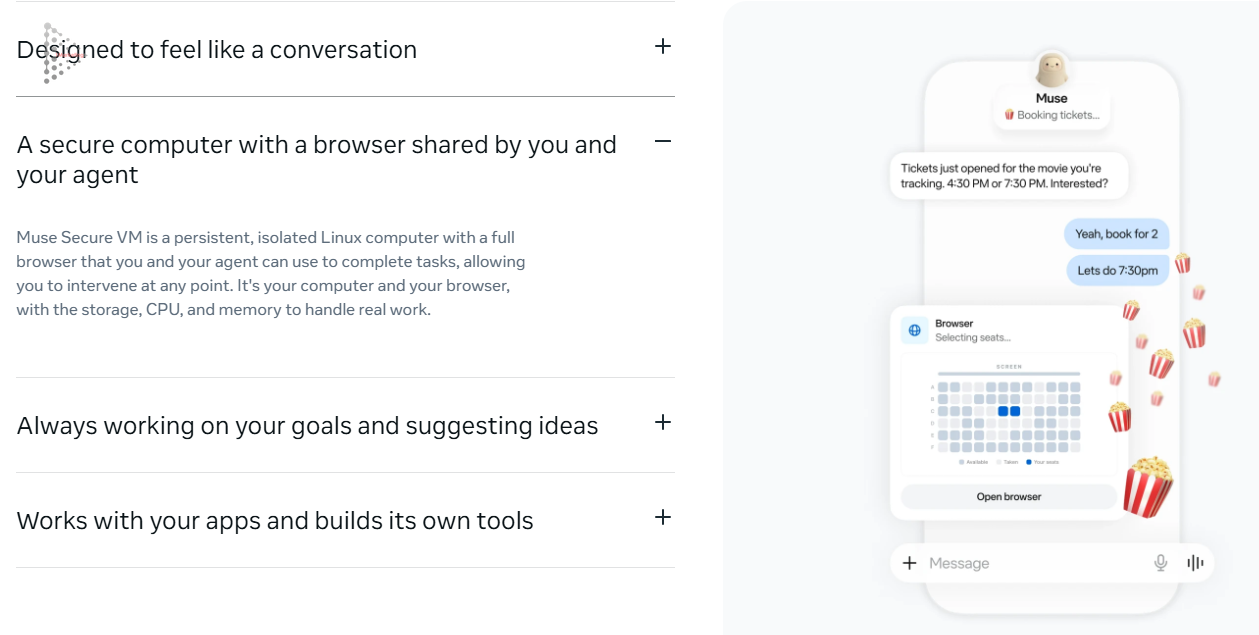
Muse Secure VM is a persistent, fully isolated Linux virtual machine provisioned uniquely for each verified subscriber within Meta's cloud. Each VM is assigned dedicated compute resources—including CPU cores, system RAM, and persistent NVMe storage—to execute intensive automation workloads without bogging down the user's physical hardware.
Embedded inside each VM is a full-featured web browser with an innovative architectural primitive: the Shared Browser. When Muse AI navigates the web to purchase event tickets, select airline seats, or interface with legacy web portals, users can observe the AI's real-time mouse movements and keyboard entries on screen. Crucially, users can click to take over keyboard and cursor control instantaneously at any microsecond.
2.2. Multi-Tiered Zero-Trust Security Safeguards
Granting web browsing and application privileges to autonomous AI exposes systems to catastrophic credential exposure and malicious Prompt Injection vectors. Meta neutralizes these threat profiles via a rigorous three-tiered defense matrix:
- Credential Isolation: User login credentials, authentication cookies, and session tokens reside in a hardware-isolated security vault. The underlying language model never ingests raw plaintext passwords. When authentication is needed, the system injects credentials over encrypted secure channels that the AI agent cannot inspect or export.
- OS-Level Sentinel Process: An autonomous watchdog daemon named Sentinel operates within the Linux kernel of the VM. Sentinel continuously inspects network packets, regulates outbound IP addresses, and terminates any unauthorized attempts to transmit confidential data to untrusted remote servers.
- Muse Confidential VM Roadmap: Meta's engineering roadmap incorporates hardware-enforced Confidential Computing memory encryption, ensuring that VM data remains cryptographically sealed even while residing in active RAM—preventing even Meta's internal cloud infrastructure engineers from inspecting private user workloads.
3. Core Business & Personal Productivity Benefits of Muse AI
By blending state-of-the-art generative comprehension with autonomous execution primitives, Muse AI delivers unparalleled productivity acceleration across enterprise and personal workflows.
3.1. Persistent Background Multi-Step Workflows
Unlike standard web-based AI chatbots that cease execution the moment a browser tab is minimized or closed, Muse AI operates within an autonomous cloud VM that functions 24/7/365, continuing mission execution even after you shut down your laptop and sleep.
Practical Scenario: You delegate: "Monitor round-trip flights between Ho Chi Minh City and Tokyo across the next 7 days. If an economy ticket drops below $320, reserve it and notify me immediately." Muse AI periodically spins up its browser, compares airline fares, and pushes a real-time reservation confirmation directly to your phone.
3.2. Natural Omnichannel Conversational Accessibility
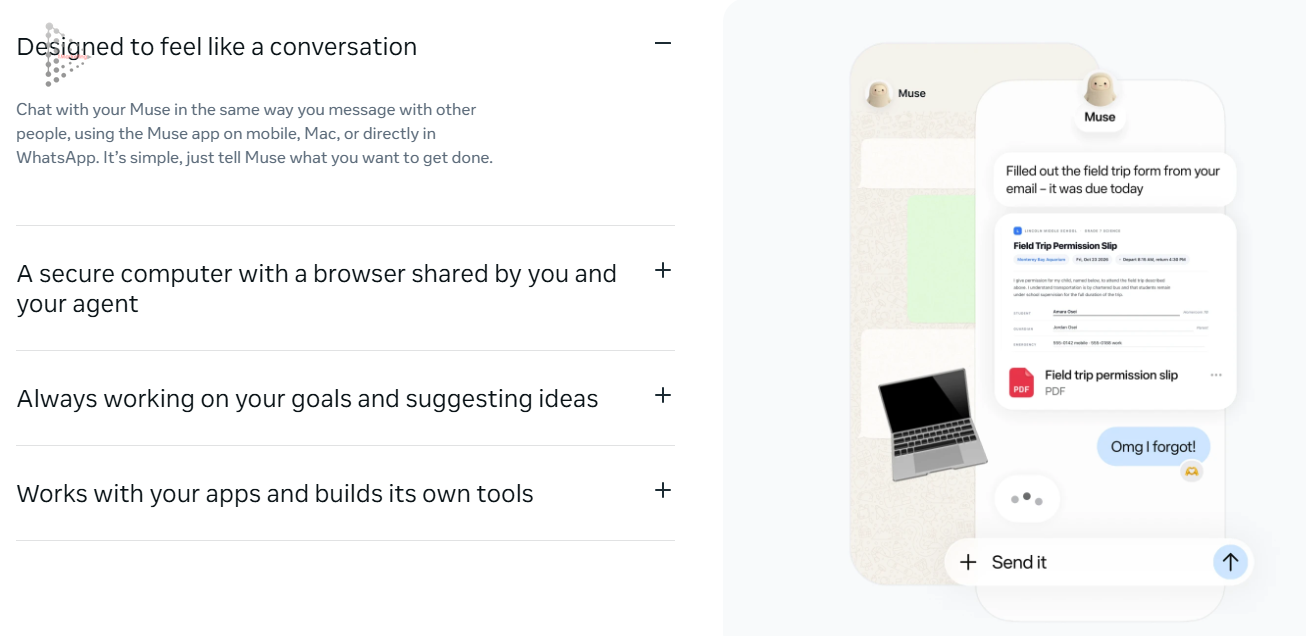
Muse AI eliminates the cognitive overhead of learning convoluted prompt formulas or scripting languages. Users delegate tasks through conversational text or rapid voice memos across ubiquitous channels:
- Native mobile applications for iOS and Android.
- Lightweight native desktop application for macOS.
- Directly inside WhatsApp, allowing complex jobs to be kicked off with a single casual text message.
Consider educational administrative tasks: Upon receiving an email containing a school field trip permission slip, Muse AI reads the message, downloads the attached PDF, populates required student information from its verified memory store, fills the form fields, and presents a completed draft for your one-click authorization.
3.3. Proactive Goal Tracking and Contextual Smart Recommendations
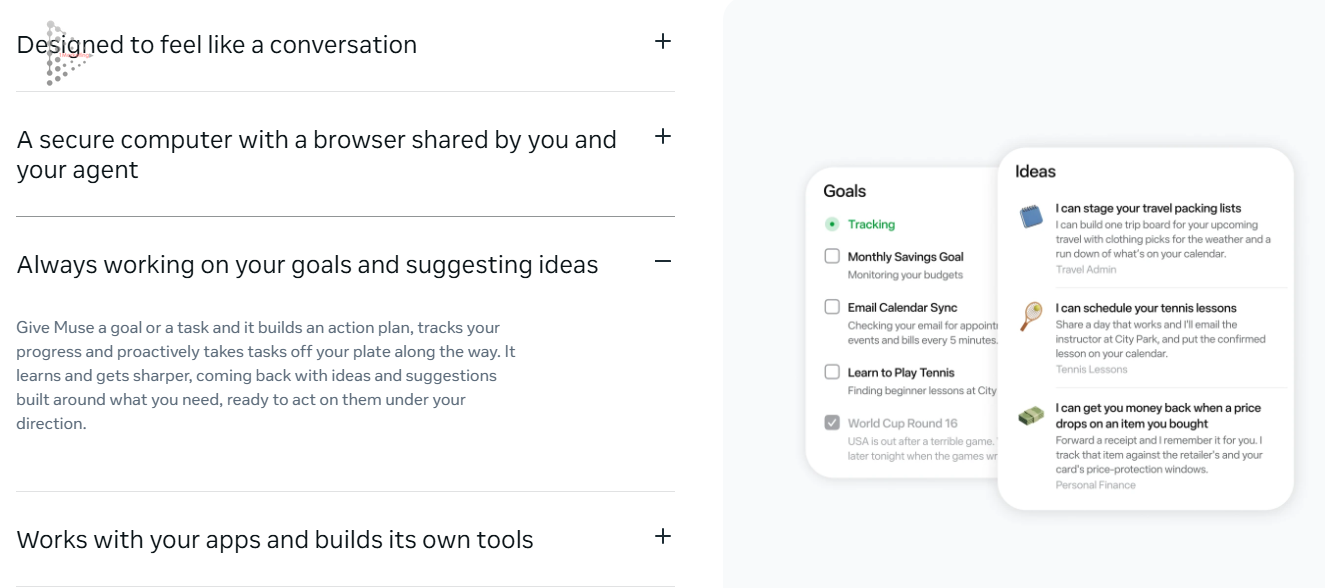
Conventional software is inherently reactive: waiting passively until a user clicks an icon. Muse AI embraces Proactive Assistance. Having mapped your calendar and preferences, Muse continually optimizes your schedule:
- Long-Range Goal Governance: Monitors personal savings budgets, issuing polite intervention prompts when spending velocity threatens monthly targets.
- Calendar & Inbox Synchronization: Audits incoming email threads every 5 minutes to detect newly proposed meeting times, expiring invoices, or flight schedule shifts—instantly synchronizing records with Google Calendar or Apple Calendar.
- Contextual Smart Ideas: If Muse detects an upcoming travel confirmation, it proactively suggests: "Shall I assemble a personalized packing checklist matched to Tokyo's forecasted weather?" Furthermore, after an online electronics purchase, Muse tracks merchant pricing during the return window to claim automated price-drop refunds.
3.4. Deep Application Integration & Self-Building Custom Tools
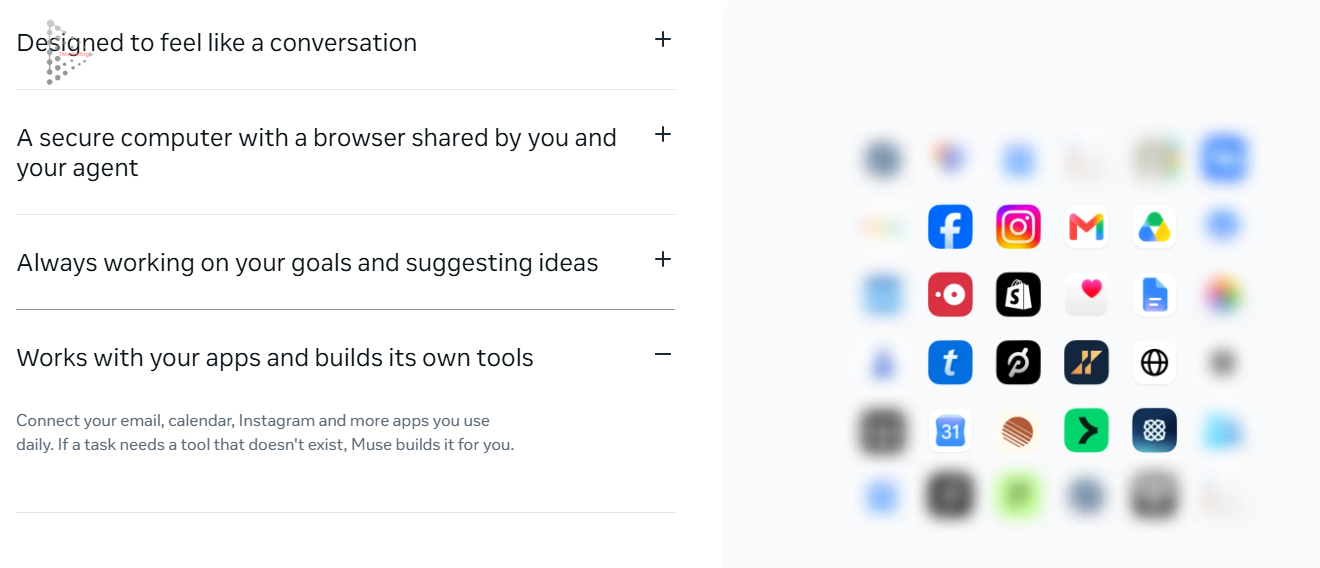
Muse AI interfaces natively with enterprise and productivity software suites:
- Productivity & Document Hubs: Gmail, Google Drive, Google Docs, Notion, Slack.
- Communication & Social Channels: WhatsApp, Messenger, Instagram, Facebook.
- Lifestyle & E-Commerce: Spotify, Peloton, travel booking platforms, and major online marketplaces.
Most remarkably, Muse features Autonomous Tool Generation. When tasked with analyzing proprietary data formats or executing niche statistical calculations lacking pre-built APIs, Muse writes dedicated Python or JavaScript scripts on the fly, executes them safely inside its Linux VM, and returns the finished deliverable without stalling.
3.5. Granular Human-in-the-Loop Governance
Despite possessing broad execution powers, Muse AI enforces strict permission hierarchies. Any operation touching private credentials, file systems, or financial funds prompts an unambiguous confirmation modal offering three explicit choices:
- Allow: Authorizes single execution for the immediate sub-task.
- Always allow: Grants persistent approval for identical future patterns.
- Deny: Aborts the action and reverts the workflow instantly.
4. Comprehensive Comparison: Muse AI vs. Leading Market Competitors
To assist digital transformation leaders in evaluating agentic technology, the table below provides a multidimensional benchmark across major AI architectures:
| Evaluation Dimension | Muse AI (Meta) | OpenAI Operator / ChatGPT | Claude Computer Use | Apple Intelligence / Copilot |
|---|---|---|---|---|
| Core Strategic Focus | Autonomous omnichannel personal agent | General web-based task automation | Developer-centric desktop orchestration | OS-native internal helper |
| Execution Environment | Isolated cloud Linux VM (Muse Secure VM) | Cloud browser sandbox | Local host OS via screenshot capture API | On-device neural processing unit (NPU) |
| Shared Interactive Browser | Yes - Real-time visual monitoring & takeover | No - Static screenshots / text output | No - Virtual cursor driven by screen grabs | Limited within Safari / Microsoft Edge |
| Self-Building Tools | Yes - Synthesizes & compiles code dynamically | Constrained within Code Interpreter | Dependent on pre-configured developer APIs | Not supported |
| Interaction Channels | Web, macOS App, Mobile (iOS/Android), WhatsApp | Web portal, Desktop client | Developer API, CLI terminal | System keybindings, Siri, Copilot Sidebar |
| Credential Security | Sentinel kernel isolation; zero plaintext access | Managed within cloud session stores | User bears full liability on local machine | Anchored to Keychain / Windows Hello |
| Consumer Usability | Extremely high - Natural conversational UX | Moderate - Requires structured prompts | Low - Requires advanced software engineering | Extremely high - Pre-installed default |
5. Step-by-Step Guide: Installing and Deploying Muse AI Across All Platforms
Follow our structured deployment protocol to initialize Muse AI securely across your devices.
5.1. Step 1: Web Account Registration and Cloud VM Provisioning
- Navigate to the official portal at
https://muse.ai. - Click Sign Up and authenticate using your verified Meta account, Google Workspace, or enterprise corporate email.
- Complete Two-Factor Authentication (2FA) to provision your dedicated Muse Secure VM cloud instance.
- Upon successful initialization, your primary Mission Dashboard displays VM readiness and browser availability.
5.2. Step 2: Native macOS Client Installation
The macOS desktop build offers the deepest system responsiveness and direct local file governance:
- Within the web portal, navigate to Downloads and select the macOS build (natively optimized for both Apple Silicon M-Series and Intel).
- Open the downloaded
.dmginstaller and drag the Muse icon into your Applications folder. - Launch Muse; the signature M glyph will dock in your macOS Menu Bar and system Dock.
- Sign in using your account credentials.
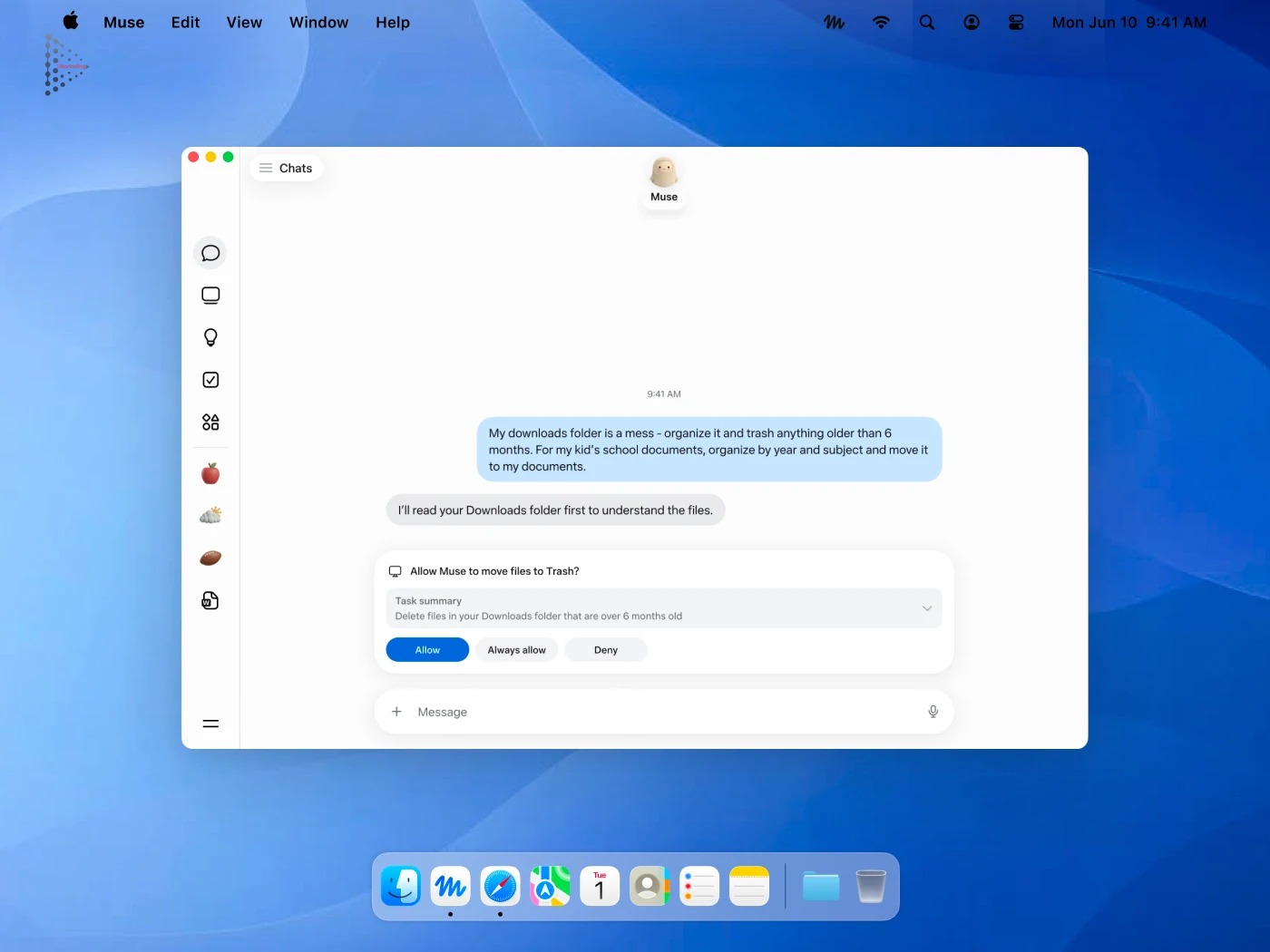
- System Permission Management: When instructing Muse to execute system housekeeping (such as cleaning your Downloads folder or structuring invoices), the OS displays a clear permission modal:
- Explicit confirmation: "Allow Muse to move files to Trash?"
- Audit summary: "Delete files in your Downloads folder that are over 6 months old"
- Click Allow for single execution or Always allow for recurring schedules.
5.3. Step 3: Mobile Setup for iOS and Android
- Open Apple App Store or Google Play Store on your mobile device.
- Search for: Muse AI - Personal Agent.
- Install the verified application package.
- Authenticate using the account initialized in Step 1 to synchronize conversation threads, goal trackers, and credentials.
- Enable microphone access for voice dictation and push notifications to receive real-time execution alerts.
5.4. Step 4: Connecting Muse via WhatsApp
One of Muse's premier conveniences is friction-free task delegation directly within WhatsApp:
- Navigate to Account Settings > Integrations inside the Muse application.
- Select WhatsApp and enter your active mobile phone number.
- Input the 6-digit verification code received from Muse's official business WhatsApp account.
- Once verified, Muse appears as an active contact in your WhatsApp list. You can immediately forward documents, dictate voice memos, or issue textual instructions within the chat thread.
5.5. Step 5: Connecting Core SaaS Ecosystems
Unlock Muse's full potential by granting authenticated access under Connected Apps:
- Email & Calendars: Connect Gmail / Google Workspace to read invitations and append calendar blocks.
- Cloud Repositories: Link Google Drive or Dropbox to index and reorganize stored collateral.
- Social Channels: Authorize Instagram and Facebook to track audience interactions and summarize mentions.
6. Practical Real-World Use Cases for Modern Enterprises and Professionals
Here are high-impact tactical workflows where Muse AI yields instantaneous efficiency gains:
6.1. Automated Personal Finance & E-Commerce Price Protection
When an online e-commerce receipt hits your inbox, Muse indexes the purchase date and vendor refund terms. If the merchant reduces the price within the 14-day or 30-day window, Muse alerts you and drafts a price-match refund claim automatically.
6.2. Autonomous Desktop Organization & Archival Cleaning
Instead of manually organizing bloated directories, issue a concise directive: "My Downloads directory is overcrowded. Move files untouched for over 6 months to Trash, and categorize all client invoices into organized subfolders by year and quarter." Muse scans MIME types, parses filenames, and reconstructs a structured taxonomy.
6.3. Relentless Competitor Research for Marketing & Sales Teams
For modern growth marketers, Muse AI operates as a tireless market research analyst:
- Spins up its cloud browser at 8:00 AM daily to scrape promotional discounts across top 10 competitors.
- Compiles pricing benchmarks into Google Sheets and transmits an executive summary to leadership via WhatsApp.
- Aggregates customer reviews across social touchpoints, flagging acute product issues before brand reputation suffers.
7. Critical Risk Management Standards for Autonomous AI Agents
Despite robust isolation safeguards, deploying autonomous agents requires disciplined governance protocols.
| Identified Risk Factor | Severity Level | Standardized Mitigation Protocol |
|---|---|---|
| Accidental Deletion Approvals | Critical | Never select "Always allow" on root directories or databases; always audit candidate file lists prior to confirmation. |
| Indirect Web Prompt Injection | High | Restrict web browsing within the sandboxed Muse Secure VM; never direct the agent toward unverified or suspicious URLs. |
| Unbounded Financial Purchases | Critical | Maintain mandatory two-factor SMS/bank app OTP verification; never persist credit card CVV codes inside autofill databases. |
| Enterprise Data Leakage | Moderate | Segregate corporate and personal Muse profiles; enforce strict GDPR, ISO 27001, and local data compliance governance. |
8. Frequently Asked Questions (FAQ)
9. Conclusion and Enterprise AI Transformation with 1Marketing
The introduction of Muse AI marks the official dawn of the autonomous agentic era. By marrying natural language intuition with the raw power of a persistent Linux cloud VM, Muse transcends the role of an informational sounding board to become an active, execution-oriented partner. Harnessing agentic AI today represents the single greatest competitive lever for professionals and businesses aiming to achieve 10x operational velocity.
At 1Marketing Agency, we pioneer the strategic deployment of enterprise AI agents and automated workflows to slash operating expenditures and drive measurable commercial growth:
- Complimentary Infrastructure & Workflow Audit: Uncover operational bottlenecks and chart an actionable roadmap for AI agent adoption.
- Bespoke AI Agent & n8n Automation Architecture: Build custom CRM synchronization funnels, autonomous competitor tracking systems, and multi-channel lead enrichment pipelines.
- Performance-Driven Business Commitments: Obsessively optimize critical commercial KPIs including Cost Per Acquisition (CPA), Cost-to-Income Ratio (CIR), and Blended ROAS.
- Real-Time Transparent Analytics: Maintain total visibility across campaign budgets and workflow efficiencies through automated live dashboards.
Book a Complimentary AI Strategy & Workflow Audit with 1Marketing
Official Website: https://1m.io.vn/en
Direct Support Hotline: (+84) 3 6669 6662
Email: [email protected]
Core Capabilities: Enterprise AI Agent Systems, n8n Marketing Automation, High-Performance Multi-Channel Ad Growth.